🔧
CountWords
ユーティリティ選択範囲のテキストの単語数をカウントする
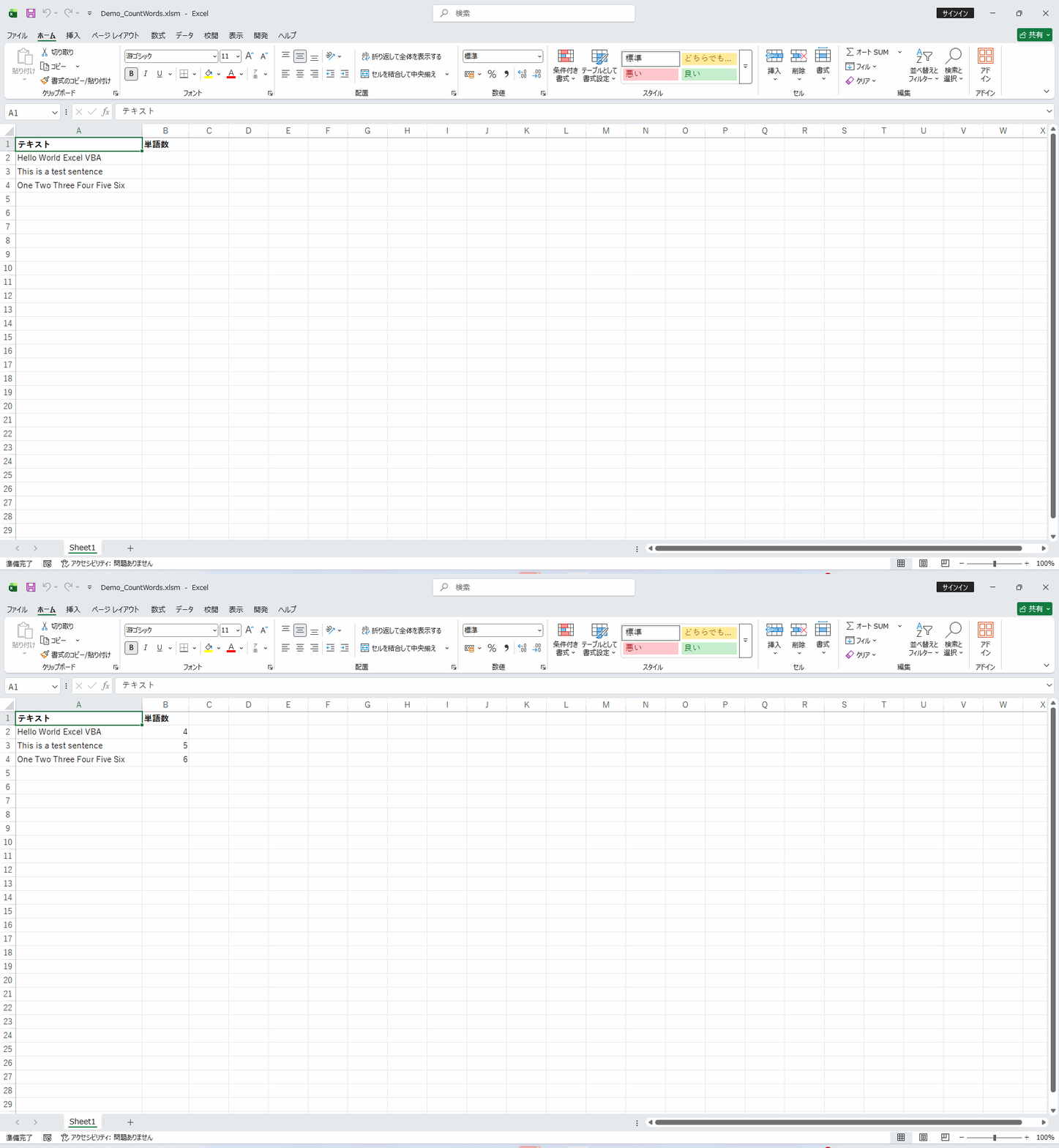
Excelセル内のテキストの単語数をVBAでカウントするマクロです。Split関数でスペース区切りに分割した配列の要素数を集計し、選択範囲の各セルについて単語数を算出して隣のセルに出力します。日本語の場合はスペースではなく文字数カウントに切り替えるロジックも実装できます。文書管理や文字数チェックが必要な業務での品質確認に活用できます。内部ではSplit関数でスペース区切りに分解した配列の要素数(UBound+1)を数えるシンプルな方式のため、英語圏のテキストでは正確に機能します。日本語のように分かち書きされない言語の場合はLen関数による文字数カウントに切り替える必要があり、対象言語に応じてロジックを使い分けることが重要です。手動でのカウントでは現実的でない大量セルの一括処理も瞬時に完了します。
📖 使い方
- VBAエディタを開く(Alt + F11)
- モジュールを挿入(挿入 > モジュール)
- 下記VBAコードをコピー&ペースト
- ブック上で実行(Alt + F8 でマクロ選択)
💡 実行例: 単語数をカウントするテキストが含まれるセル範囲を選択して実行
🎯 活用シーン
- ✓商品説明テキストの文字数・単語数を一括チェックしてSEO基準を確認
- ✓アンケート自由回答欄の記述量を自動集計して分析
- ✓翻訳コスト見積もりのための原文単語数カウントを自動化
- ✓ECサイトの商品説明文が文字数制限内に収まっているか、出品前に一括チェックしたいとき
- ✓英文レポートの分量を単語数ベースで把握し、翻訳や校正の見積もりに活用したいとき
💡 実装のヒント
- ▸Split(Trim(text), " ") で単語配列に分解してUBound+1が単語数です
- ▸連続スペースを除去するにはWorksheetFunction.Trimを使います
- ▸Len関数で文字数カウントも同時に出力できます
- ▸英数字と日本語が混在するテキストでは、正規表現で言語ごとの文字種を判定してからカウント方法を分岐させると精度が上がります。
- ▸改行やタブを含むセルでは、事前にTrimSpacesで余分な空白を除去してからカウントすると誤差が減ります。
💻 VBAコード
' CountWords
' -----------------
' Macro Name: CountWords
' Description: 選択範囲のテキストの単語数をカウントする
' Parameters: なし
' Returns: なし
' Usage: 単語数をカウントするテキストが含まれるセル範囲を選択して実行
' -----------------

Sub CountWords()
    Dim cell As Range
    Dim resultWs As Worksheet
    Dim outputRow As Long
    Dim totalWords As Long
    Dim cellWords As Long

    On Error GoTo ErrorHandler

    If TypeName(Selection) <> "Range" Then
        MsgBox "セル範囲を選択してください。", vbExclamation
        Exit Sub
    End If

    Set resultWs = Worksheets.Add(After:=Worksheets(Worksheets.Count))
    resultWs.Name = "単語数_" & Format(Now, "hhnnss")

    resultWs.Cells(1, 1).Value = "単語数カウント結果"
    resultWs.Cells(1, 1).Font.Bold = True
    resultWs.Cells(1, 1).Font.Size = 14

    resultWs.Cells(3, 1).Value = "セル"
    resultWs.Cells(3, 2).Value = "テキスト"
    resultWs.Cells(3, 3).Value = "単語数"
    resultWs.Cells(3, 1).Font.Bold = True
    resultWs.Cells(3, 2).Font.Bold = True
    resultWs.Cells(3, 3).Font.Bold = True
    resultWs.Range(resultWs.Cells(3, 1), resultWs.Cells(3, 3)).Interior.Color = RGB(200, 200, 200)

    outputRow = 4
    totalWords = 0

    For Each cell In Selection
        If cell.Value <> "" Then
            Dim text As String
            Dim words() As String
            text = CStr(cell.Value)
            words = Split(Trim(text))
            cellWords = 0
            Dim i As Long
            For i = LBound(words) To UBound(words)
                If words(i) <> "" Then
                    cellWords = cellWords + 1
                End If
            Next i

            resultWs.Cells(outputRow, 1).Value = cell.Address
            resultWs.Cells(outputRow, 2).Value = Left(text, 50) & IIf(Len(text) > 50, "...", "")
            resultWs.Cells(outputRow, 3).Value = cellWords
            resultWs.Cells(outputRow, 3).Font.Bold = True
            totalWords = totalWords + cellWords
            outputRow = outputRow + 1
        End If
    Next cell

    resultWs.Cells(outputRow + 1, 1).Value = "合計単語数:"
    resultWs.Cells(outputRow + 1, 1).Font.Bold = True
    resultWs.Cells(outputRow + 1, 3).Value = totalWords
    resultWs.Cells(outputRow + 1, 3).Font.Bold = True

    resultWs.Columns("A:C").AutoFit
    resultWs.Select

    MsgBox "単語数カウント完了: 合計 " & totalWords & " 語", vbInformation
    Exit Sub

ErrorHandler:
    MsgBox "エラーが発生しました: " & Err.Description, vbCritical
End Sub